IM架构(二)、JSQMessageViewController
作者很懒, 直接把Git的README拷贝了过来。
当讲到(三)的时候, 就开始写IMLib了。
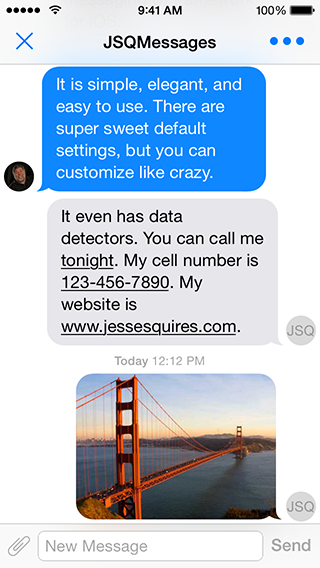 Screenshot0
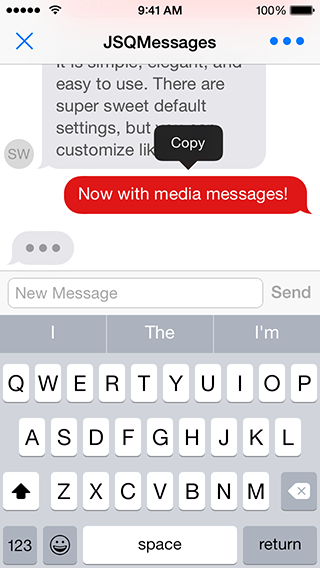 Screenshot1
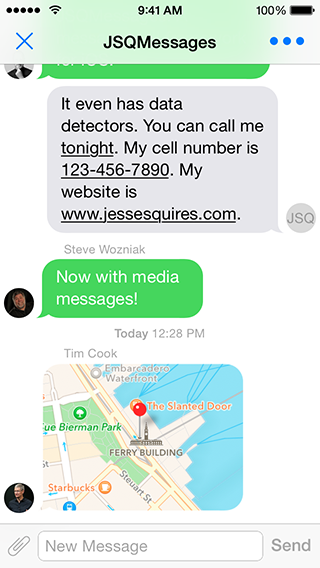 Screenshot2
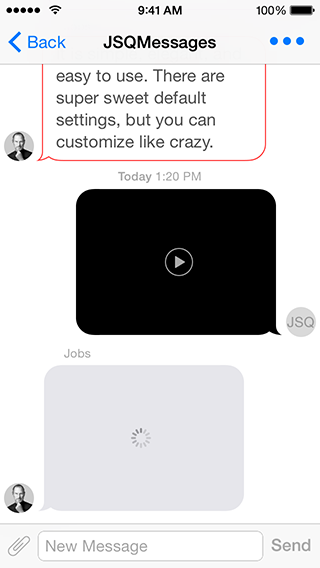 Screenshot3
More screenshots available at CocoaControls
Features
See the website for the list of features.
Dependencies
Requirements
- iOS 7.0+
- ARC
Installation
From CocoaPods:
# For latest release in cocoapods
pod 'JSQMessagesViewController'

# Feeling adventurous? Get the latest on develop
pod 'JSQMessagesViewController', :git => 'https://github.com/jessesquires/JSQMessagesViewController.git', :branch => 'develop'

# For version 5.3.2
pod 'JSQMessagesViewController', :git => 'https://github.com/jessesquires/JSQMessagesViewController', :branch => 'version_5.3.2_patch'
Without CocoaPods:
- Why aren't you using CocoaPods?
- Drag the
JSQMessagesViewController/folder to your project and installJSQSystemSoundPlayer.
NOTE:
This repo was formerly named
MessagesTableViewController.And this pod was formerly named
JSMessagesViewController.
Getting Started
#import <JSQMessagesViewController/JSQMessages.h> // import all the things
Read the blog post about the 6.0 release!
-
Demo Project
- There's a sweet demo project:
JSQMessages.xcworkspace. - Run
pod installfirst. - Firebase also has a sweet demo project, and it's in Swift!
- There's a sweet demo project:
-
Message Model
- Your message model objects should conform to the
JSQMessageDataprotocol. - However, you may use the provided
JSQMessageclass.
- Your message model objects should conform to the
-
Media Attachment Model
- Your media attachment model objects should conform to the
JSQMessageMediaDataprotocol. - However, you may use the provided classes:
JSQPhotoMediaItem,JSQLocationMediaItem,JSQVideoMediaItem. - Creating your own custom media items is easy! Simply follow the pattern used by the built-in media types.
- Also see
JSQMessagesMediaViewBubbleImageMaskerfor masking your custom media views as message bubbles.
- Your media attachment model objects should conform to the
-
Avatar Model
- Your avatar model objects should conform to the
JSQMessageAvatarImageDataSourceprotocol. - However, you may use the provided
JSQMessagesAvatarImageclass. - Also see
JSQMessagesAvatarImageFactoryfor easily generating custom avatars.
- Your avatar model objects should conform to the
-
Message Bubble Model
- Your message bubble model objects should conform to the
JSQMessageBubbleImageDataSourceprotocol. - However, you may use the provided
JSQMessagesBubbleImageclass. - Also see
JSQMessagesBubbleImageFactoryandUIImage+JSQMessages.hfor easily generating custom bubbles.
- Your message bubble model objects should conform to the
-
View Controller
- Subclass
JSQMessagesViewController. - Implement the required methods in the
JSQMessagesCollectionViewDataSourceprotocol. - Implement the required methods in the
JSQMessagesCollectionViewDelegateFlowLayoutprotocol. - Set your
senderIdandsenderDisplayName. These properties correspond to the methods found inJSQMessageDataand determine which messages are incoming or outgoing.
- Subclass
-
Customizing
- The demo project is well-commented. Please use this as a guide.
Quick Tips
Springy bubbles?
- (void)viewDidAppear:(BOOL)animated
{
    [super viewDidAppear:animated];
    self.collectionView.collectionViewLayout.springinessEnabled = YES;
}
Remove avatars?
- (void)viewDidLoad
{
    [super viewDidLoad];
    self.collectionView.collectionViewLayout.incomingAvatarViewSize = CGSizeZero;
    self.collectionView.collectionViewLayout.outgoingAvatarViewSize = CGSizeZero;
}

- (id<JSQMessageAvatarImageDataSource>)collectionView:(JSQMessagesCollectionView *)collectionView avatarImageDataForItemAtIndexPath:(NSIndexPath *)indexPath
{
    return nil;
}
Customize your cells?
- (UICollectionViewCell *)collectionView:(JSQMessagesCollectionView *)collectionView cellForItemAtIndexPath:(NSIndexPath *)indexPath
{
    JSQMessagesCollectionViewCell *cell = (JSQMessagesCollectionViewCell *)[super collectionView:collectionView cellForItemAtIndexPath:indexPath];

    // Customize the shit out of this cell
    // See the docs for JSQMessagesCollectionViewCell

    return cell;
}
Customize your toolbar buttons?
- (void)viewDidLoad
{
    [super viewDidLoad];

    // This button will call the `didPressAccessoryButton:` selector on your JSQMessagesViewController subclass
    self.inputToolbar.contentView.leftBarButtonItem = /* custom button or nil to remove */

    // This button will call the `didPressSendButton:` selector on your JSQMessagesViewController subclass
    self.inputToolbar.contentView.rightBarButtonItem = /* custom button or nil to remove */

    // Swap buttons, move send button to the LEFT side and the attachment button to the RIGHT
    // For RTL language support
    self.inputToolbar.contentView.leftBarButtonItem = [JSQMessagesToolbarButtonFactory defaultSendButtonItem];
    self.inputToolbar.contentView.rightBarButtonItem = [JSQMessagesToolbarButtonFactory defaultAccessoryButtonItem];

    // The library will call the correct selector for each button, based on this value
    self.inputToolbar.sendButtonOnRight = NO;
}
Questions & Help
There's a label for that. Before asking a question, see if it has already been answered. There's also a tag on StackOverflow, which is often the more appropriate place for questions and help. Please only ask questions that are specific to this library.
NOTE: Please try to avoid emailing me with questions. I prefer to keep questions and their answers open-source.
Migrating between major versions
From 5.x to 6.x
See the 6.0 release notes for details about API changes.
From 6.x to 7.x
See the 7.0 release notes for details about API changes.
Documentation
Read the fucking docs, available here via @CocoaDocs.
Contribute
Please follow these fucking sweet contribution guidelines.
Donate
Support the development of this free open-source library!
Donations made via Square Cash
<h4><a href="mailto:jesse.squires.developer@gmail.com?cc=cash@square.com&subject=$5&body=Thanks for developing JSQMessagesViewController!">Send $5</a> <em>Just saying thanks. Here's a coffee!</em> :coffee:</h4>
<h4><a href="mailto:jesse.squires.developer@gmail.com?cc=cash@square.com&subject=$10&body=Thanks for developing JSQMessagesViewController!">Send $10</a> <em>This library is great. Lunch is on me!</em> :ramen:</h4>
<h4><a href="mailto:jesse.squires.developer@gmail.com?cc=cash@square.com&subject=$25&body=Thanks for developing JSQMessagesViewController!">Send $25</a> <em>This totally saved me time. Go get a nice dinner!</em> :fork_and_knife:</h4>
<h4><a href="mailto:jesse.squires.developer@gmail.com?cc=cash@square.com&subject=$50&body=Thanks for developing JSQMessagesViewController!">Send $50</a> <em>I love this library. I want new features!</em> :clap:</h4>
<h4><a href="mailto:jesse.squires.developer@gmail.com?cc=cash@square.com&subject=$100&body=Thanks for developing JSQMessagesViewController!">Send $100</a> <em>I really want to support this project!</em> :tada:</h4>
You can also send donations via PayPal. Message me on twitter.
Credits
Created by @jesse_squires, a programming-motherfucker.
- Assets extracted using @0xced / iOS-Artwork-Extractor.
- Originally inspired by @soffes / SSMessagingViewController.
- Many thanks to the contributors of this project.
About
I initially developed this library to use in Hemoglobe for private messages between users.
As it turns out, messaging is something that iOS devs and users really want. Messaging of any kind has turned out to be an increasingly popular mobile app feature in all sorts of contexts and for all sorts of reasons. Thus, I am supporting this project in my free time and have added features way beyond what Hemoglobe ever needed.
Feel free to read my blog and check out my work at Hexed Bits.
Apps using this library
- Hemoglobe
- PocketSuite
- Signal
- ClassDojo
- Schools App
- ChatSecure
- Bryx 911
- Kytt
- Spark Social
- Spabbit
- Elodie
- Instaply
- Loopse
- Oxwall Messenger
- FourChat
- vCinity
- Quick Text Message
- Libraries for developers
- Buhz|Hyve
- Ringring.io
- gDecide
- AwesomeChat
- ParseChat
- Jib
- Onvolo
- EVCloudKitDao
- Fluky Chat
- VillageUnity
- Pine
- NotificationChat
- RealtimeChat
- Bazar
- Roomie
- PimpMyCall
- Your app here
License
JSQMessagesViewController is released under an MIT License. See LICENSE for details.
Copyright © 2013-present Jesse Squires.
Please provide attribution, it is greatly appreciated.


