springweb开发中编码乱码问题解析
因为平时开发过程中总遇到乱码的问题,很烦恼,因此总结了一下,加深了自己的印象,有些粗糙。最有效的是自己撸码模拟一下所有可能出现乱码的情况。
为什么会出现乱码
一句话就能说明问题: 字符在保存时的编码格式如果和要显示(解码)时的编码格式不一样的话,就会出现乱码问题。因此我们的前后端编码一般都一致使用UTF-8.
几种乱码解析
- "??"乱码分析:
ISO-8859-1 仅能编码非英文字符,所以非英文字符被其编码时会被转换为 0x3F(即?的 ASCII 编码,也是 UTF-8 编码),这时编码已经真被转成不可逆的乱码了。之后无论用兼容 ASCII 的哪种编码方案解码还原出的字符串都是"?"。 - "²âÊÔ"乱码分析:
ISO-8859-1 仅能表示非英文字符,所以使用其解码时会严格按一个字节一个字节地进行解析(这种操作其实对编码没构成破坏,还可以重新用 ISO-8859-1 获取字节流后再用正确的编码方式解码得到正确的字符串)。 - "����"乱码分析:
用 UTF-8 解码经 GB18030 编码的字节流时发现四个字节均为 UTF-8 非法字节流,所以直接转化为了�。
决定编码的因素
一个http请求经过的环节:
浏览器--->服务器---->浏览器
在这个环节中每一步都会有影响编码的因素:
1.页面编码
HTML meta data 中的 charset
<head>
    <meta http-equiv="Content-Type" content="text/html; charset=UTF-8">
    <title>hello</title>
</head>
2.浏览器编码
浏览器编码的设置和页面编码不一致会导致页面文字显示乱码
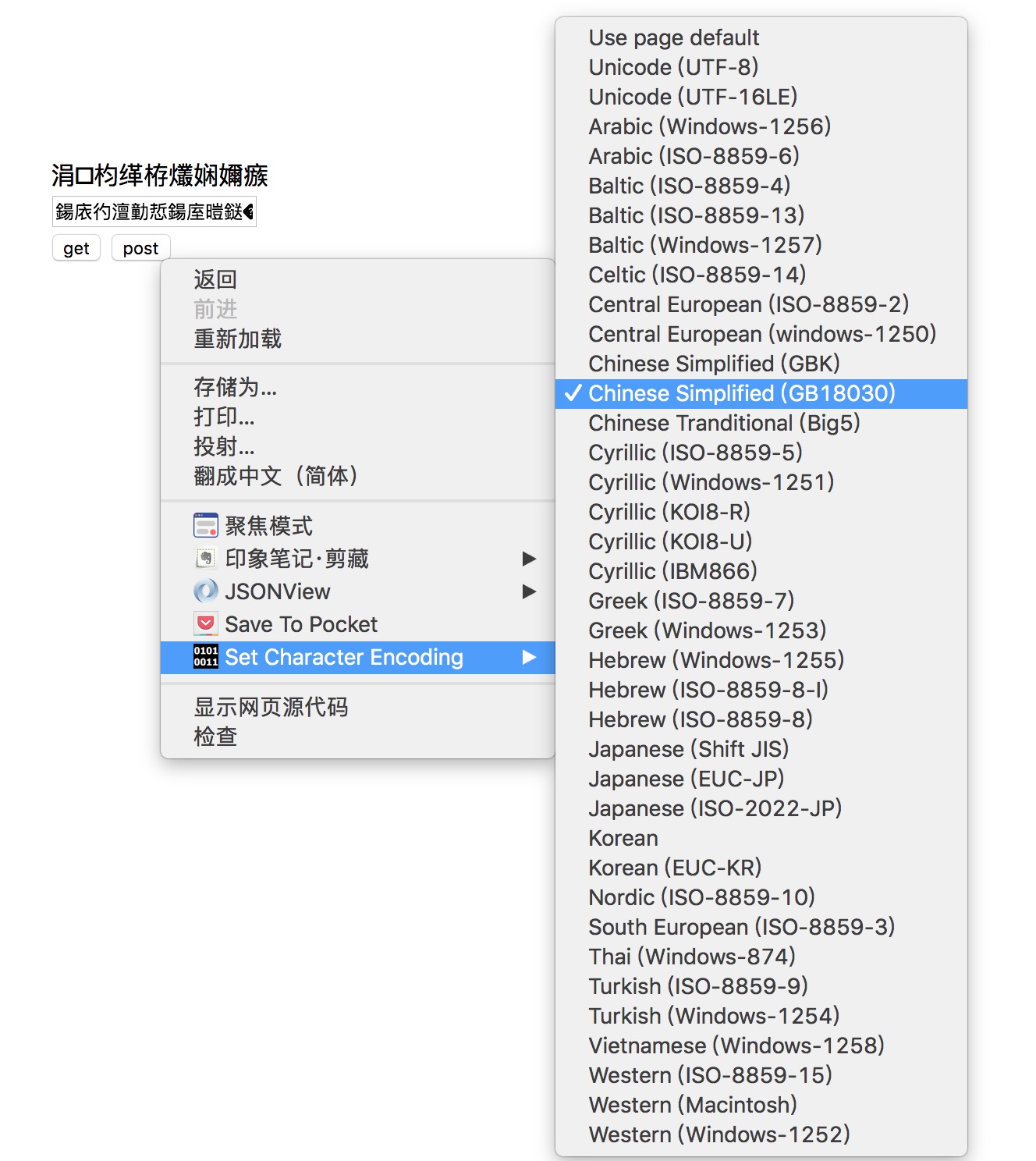 Jietu20171013-001221.jpg-303.2kB
3.ajax请求
ajaxGet
AjaxGet中的查询参数会受浏览器编码影响,所以最好使用 encodeURI 或 encodeURIComponent 手动显式地将整个 URL 或者查询字符串按 UTF-8 编码。
ajaxPost
ajaxPost 请求时对于 URI 和请求体都是默认按 utf-8 编码,而不受 content type 影响。 所以 ajaxPost 不乱码的必要条件是将服务端 request 中的 characterEncoding 设为"utf-8"。
4.spring编码
通过类org.springframework.web.filter.CharacterEncodingFilter,定义request和response的编码。这是因为在spring源码里默认用的是ISO-8859-1,对中文支持不好,因此这里配置成UTF-8.
在web.xml里配置
<filter>
        <filter-name>CharacterEncodingFilter</filter-name>
        <filter-class>org.springframework.web.filter.CharacterEncodingFilter</filter-class>
        <init-param>
            <param-name>encoding</param-name>
            <param-value>UTF-8</param-value>
        </init-param>
        <init-param>
            <param-name>forceEncoding</param-name>
            <param-value>true</param-value>
        </init-param>
    </filter>
    <filter-mapping>
        <filter-name>CharacterEncodingFilter</filter-name>
        <url-pattern>/*</url-pattern>
    </filter-mapping>
CharacterEncodingFilter类具有encoding和forceEncoding两个属性,其中encoding是表示设置request的编码,forceEncoding表示是否同时设置response的编码。
5.tomcat配置
<Connector port="8080" protocol="HTTP/1.1"
               connectionTimeout="20000"
               redirectPort="8443" URIEncoding="UTF-8" />
Tomcat的conf里的server.xml里的配置,一般配置成UTF-8,也有配置成ISO-8859-1,这里的配置在发起get请求时会对uri进行编码,因此需要进行处理,不然会出现乱码。但是对post请求的body不会产生影响。
解决方法:
$.ajax({
        url:"/hello?param=" + encodeURI(encodeURI($("#before").html())),
        type:"GET",
        contentType:"application/x-www-form-urlencoded; charset=utf-8",
        success:function(result){
            $("#after").val(result);
        }
    });
对get请求的url里的参数进行两次encodeURI;
@RequestMapping(value = "/hello",method = RequestMethod.GET,produces = "text/plain;charset=UTF-8")
    @ResponseBody
    public String index(@RequestParam("param") String param) throws UnsupportedEncodingException {

        String newParam = URLDecoder.decode(param,"utf-8");
        String handleMsg = "后台处理后数据:";
        String result = handleMsg + newParam;
        return result;
    }
后台获取参数时进行一次解码,这样获取到的参数就不会出现乱码。
代码地址:https://github.com/PanPanda/encodingDemo
参考文章:深入分析 web 请求响应中的编码问题


